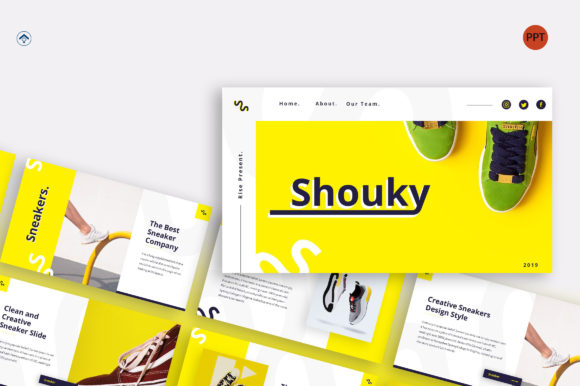
Shouky: A Modern Template for Dynamic Presentations
In the fast-paced world of professional communication, the way you present your ideas is just as important as the ideas themselves. A cluttered, outdated, or generic slide deck can undermine even the most brilliant concept. This is where the Shouky – PowerPoint Template enters the picture, offering a sophisticated and versatile foundation for anyone looking to deliver their message with clarity and visual impact. It’s more than just a collection of slides; it’s a structured system designed to help you tell your story effectively.
A Design Built for Clarity and Focus
The first thing you notice about Shouky is its clean, modern aesthetic. It doesn’t rely on flashy animations or overwhelming graphics. Instead, its strength lies in its thoughtful layout and balanced use of space. The template embraces contemporary modern typography, using a harmonious combination of serif font for headings to convey authority and a clean sans serif font for body text to ensure effortless readability. This deliberate approach to typeface selection creates a natural visual hierarchy, guiding your audience’s eye exactly where you want it to go—from a powerful headline to supporting data and key takeaways.
The personality of Shouky is professional yet approachable. It avoids the sterile, corporate feel of some templates while steering clear of overly casual styles. This balance makes it an excellent design asset for a wide range of contexts. Whether you’re a startup founder pitching to investors, a marketing manager presenting a quarterly report, or a creative freelancer showcasing a portfolio, the template provides a polished canvas that elevates your content without distracting from it.
Practical Applications Across Industries
The true value of a premium template like this lies in its adaptability. The 35 pre-designed slides aren’t just random layouts; they are crafted to solve common presentation challenges. For a brand agency or company profile, you’ll find slides perfectly structured for mission statements, team introductions, service overviews, and case studies. The clean grid system helps maintain brand identity consistency, ensuring every slide feels like part of a cohesive whole.
For those in product promotion or startup environments, Shouky excels at making data digestible. Charts, timelines, and comparison slides are designed to transform complex information into clear, engaging visuals. The pitch deck slides are particularly noteworthy, providing a logical flow from problem to solution, market opportunity, and financial projections. This structure is invaluable for entrepreneurs who need to convey confidence and competence quickly.
Beyond the corporate world, the template’s versatility shines. A photographer or designer can use the portfolio slides to let their work take center stage, thanks to generous image placeholders and minimal text areas. Even for personal projects, like a community proposal or a hobbyist’s tutorial, Shouky offers a professional framework that lends credibility to your ideas.
Key Features That Streamline Your Workflow
Functionality is at the core of Shouky’s design. The 16:9 wide screen ratio is the modern standard, ensuring your presentation looks crisp and fills the screen on any contemporary display or projector. The use of Master Slides is a game-changer for efficiency. By editing the master, you can apply global changes to fonts, colors, and logos across all 35 slides in seconds, guaranteeing consistency and saving you hours of manual work.
The template is built for ease of use. The picture placeholder feature is a simple yet powerful tool—just drag and drop your images, and they automatically conform to the designed shapes and sizes. Every graphic element, from icons to charts, is fully resizable and editable, allowing you to customize colors and proportions to match your specific brand identity without breaking the layout. The inclusion of recommended free web fonts also means you won’t face licensing headaches, making it a truly accessible commercial font solution.
Choosing and Implementing Shouky Effectively
Before diving in, consider how Shouky aligns with your project’s goals. Its clean, structured style is ideal for content that needs to feel authoritative, innovative, and organized. If your brand personality is more whimsical or handcrafted, you might need to adapt the color palette and imagery more heavily to soften its professional edge.
A great practice is to start with your content outline. Let the template’s structure guide the flow of your narrative. Use the title slides for strong openings, the content slides for detailed explanations, and the portfolio or team slides to build trust and connection. Don’t feel constrained to use every slide—it’s better to select the layouts that best serve your specific points.
When it comes to font pairing, the template’s suggested fonts work beautifully together. However, if you wish to customize, stick to the principle of contrast and compatibility. Pair the provided display font for headings with a complementary sans serif for body text to maintain readability. Always test your final presentation on the actual screen you’ll be using to check for font rendering and spacing.
Ultimately, the Shouky – PowerPoint Template is a robust tool designed to make you look good. It handles the heavy lifting of design and layout, freeing you to focus on what truly matters: your message, your story, and your connection with the audience. In a world where attention is scarce, having a professional and easily editable foundation like this isn’t just a convenience—it’s a strategic advantage for anyone who needs to communicate ideas effectively.