Covilabs - Covid Medical Googleslide Template
Professional Medical Presentations Made Simple
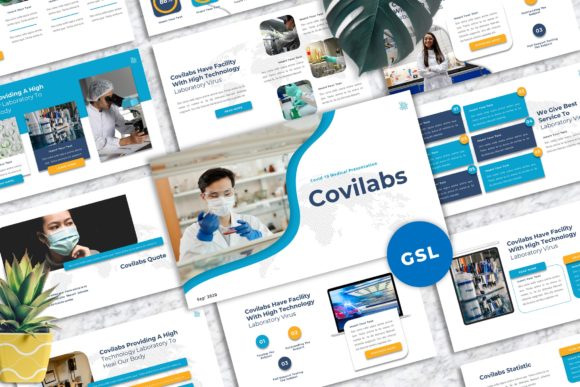
When you're preparing a presentation for a medical conference, healthcare training session, or public health briefing, the last thing you want is to spend hours wrestling with slide layouts. The Covilabs - Covid Medical Googleslide Template solves this problem directly. With 40 master slide layouts designed specifically for medical and healthcare contexts, this template gives you a polished starting point that looks professional from the first click.
The visual style leans clean and clinical without feeling cold. You'll find a modern typography approach that balances readability with visual interest, making dense medical information easier to digest. The 16:9 widescreen ratio works perfectly for conference projectors, laptop screens, and video calls — all scenarios where medical professionals regularly present. Every element is vector-based, which means your graphics stay sharp whether you're projecting on a large screen or sharing a PDF with colleagues.
What Makes This Template Stand Out
Most presentation templates force you into rigid structures. The Covilabs - Covid Medical Googleslide Template takes a different approach. The picture placeholders and drag-and-drop image functionality mean you can swap in your own X-rays, facility photos, or data visualizations without breaking the layout. The easy color change feature lets you adapt the palette to match your organization's brand identity in seconds, which matters when you're representing a hospital system, research institution, or public health agency.
The mockup devices included are a practical touch. If you're presenting telehealth data, mobile app interfaces, or digital health platform screenshots, having realistic device frames adds credibility to your slides. These aren't decorative flourishes — they serve a real purpose in medical communication where showing how technology integrates with patient care strengthens your message.
Here's what you get in the package:
- 40 master slide layouts covering title slides, content layouts, data presentations, team introductions, and more
- Resizable and editable graphics that adapt to your specific content needs
- Free web fonts recommended in the documentation, so you avoid licensing headaches
- Google Slides compatibility through the included .PPTX file
- A documentation file with setup instructions and font details
Real-World Applications Beyond Healthcare
While the template's design language speaks directly to medical and healthcare audiences, its clean structure works surprisingly well for other contexts. A creative studio could use the data-heavy layouts for project timelines. A small business owner might find the team slide layouts useful for company presentations. The strong focus on typography and usability means the slides communicate clearly regardless of your specific industry.
I've seen similar templates repurposed effectively for corporate training materials, educational workshops, and even personal portfolios. The key is that good design fundamentals — clear hierarchy, balanced spacing, consistent styling — translate across disciplines. The Covilabs - Covid Medical Googleslide Template gets these fundamentals right, which gives you flexibility in how you use it.
For entrepreneurs pitching health-tech startups, this template provides the visual credibility investors expect. For marketers working with pharmaceutical or wellness brands, the medical aesthetic lends authority to campaign presentations. Content creators in the health and wellness space can use it for YouTube presentations, webinar slides, or educational course materials.
Practical Tips for Getting the Most Value
Before diving in, take ten minutes to review the documentation file. It lists the recommended fonts and explains the master slide system. Understanding how master slides work saves you significant editing time because changes to the master automatically update all related slides.
When choosing which layouts to use, think about your audience first. A room full of physicians expects dense data slides with charts and statistics. A community health presentation benefits from more visual layouts with larger images and simpler text blocks. The 40 available layouts give you enough variety to match different presentation contexts without feeling repetitive.
For font pairings, stick with the recommended free web fonts initially. They were selected to complement the template's design system. If you need to match an existing brand, test your brand fonts against a few sample slides before committing to a full redesign. Sometimes a typeface that looks great in a logo design doesn't translate well to body text on presentation slides.
Color customization deserves attention too. Medical presentations often use blues and greens for their calming associations, but your organization might have specific brand guidelines. The template's easy color change feature handles this, but test your chosen palette on a projector or screen beforehand. Colors that look good on your laptop can appear differently under conference room lighting.
Final Thoughts on Presentation Quality
A well-designed presentation template does something subtle but important — it removes design decisions from the equation so you can focus on your actual message. The Covilabs - Covid Medical Googleslide Template handles the visual framework while you concentrate on the content that matters to your audience.
The fact that all graphics are editable and resizable means the template grows with your needs. Your first presentation might use the default layouts, but by your fifth, you'll have customized the color scheme, developed consistent image treatments, and built a recognizable visual language for your presentations. That kind of consistency builds professional recognition over time.
Whether you're presenting COVID research findings, training healthcare workers, pitching a medical device, or building a health-focused brand, having a reliable design foundation makes the difference between slides that distract and slides that support your expertise. This template gives you that foundation without requiring design skills or expensive software.