LYLAC-PowerPoint Template: Your Shortcut to Stunning Presentations
A Template Built for Modern Professionals
Creating a presentation that feels both professional and visually engaging can be a significant time sink. The LYLAC-PowerPoint Template is designed to solve that exact problem. It’s a comprehensive, creative presentation toolkit that allows you to build a polished, high-impact deck without starting from a blank slide. Think of it as a pre-designed foundation for your ideas, ready to be customized in just a few clicks. For entrepreneurs, marketers, and creative professionals, this template is a practical design asset that bridges the gap between a good idea and a great visual delivery.
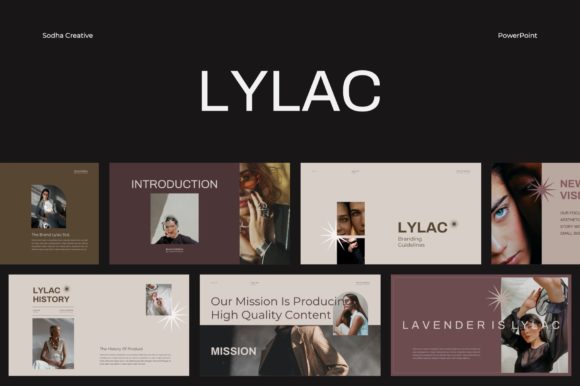
At its core, the LYLAC template offers a clean, modern, and versatile aesthetic. Its visual personality is professional yet approachable, making it suitable for a wide range of contexts—from a corporate quarterly review to a creative portfolio showcase. The design language avoids overly trendy elements that might date quickly, focusing instead on clear layouts, balanced white space, and a harmonious color palette that you can easily adapt to your own brand identity. This makes it a reliable choice for anyone who needs their presentation to look credible and contemporary.
Where This Template Truly Shines
The real strength of the LYLAC-PowerPoint Template lies in its adaptability. It’s not a one-trick pony designed for a single industry. Its 30 pre-designed slides cover a multitude of common presentation needs. Here’s where it becomes particularly useful:
- Brand & Marketing Pitches: When presenting a new campaign, a brand strategy, or market research to clients or stakeholders, a cohesive and professional deck is non-negotiable. The template’s structured layouts help you tell a compelling story, with dedicated slides for data visualization, timelines, team introductions, and key takeaways. This ensures your message is supported by a visual system that enhances credibility.
- Internal Business Communications: For team meetings, project updates, or training sessions, consistency fosters clarity. Using a master slide-based template like LYLAC ensures every department’s presentation looks unified, reinforcing a sense of professionalism and attention to detail within the organization.
- Creative Portfolios & Case Studies: Designers, photographers, and agencies need to showcase their work in a way that doesn’t distract from the content itself. The template’s grid-based layout and high-resolution (1920x1080 pixel) design provide a clean gallery-style frame for your projects, allowing the work to stand out while the presentation maintains a polished feel.
- Educational & Workshop Materials: For educators, bloggers, or content creators hosting webinars or workshops, the ability to customize content easily is key. The fully editable nature of the LYLAC slides means you can quickly adapt content for different audiences or update information for a recurring series, saving valuable preparation time.
Practical Guidance for Using the LYLAC Template
Having a great template is only half the battle; using it effectively is what makes the difference. Here’s some practical advice for getting the most out of the LYLAC-PowerPoint Template.
Start with Your Content, Not the Slides. Before you even open the file, outline your presentation’s narrative. What is the core message? What are the key supporting points? Once you have a clear structure, you can map your content to the most appropriate slide layouts within the template. This prevents you from forcing your message into a design that doesn’t quite fit.
Embrace the Grid and Guides. One of the template’s most helpful features is its layout with grids and guides. These are not just for show. Use them to align your text boxes, images, and graphics precisely. Consistent alignment is a subtle but powerful element of professional design that creates visual harmony and makes your slides easier to scan.
Customize with Intention. The template is a starting point. Use the master slides to set your brand’s primary color palette and choose fonts that align with your brand identity—whether that’s a clean sans serif font for a modern tech company or a more traditional serif font for a legal firm. Replace placeholder text and images with your own high-quality assets. The included mockups can be particularly useful for displaying app screens or website designs in a realistic context.
Remember the Technical Details. The template is provided in both .PPTX and .PPT formats, ensuring compatibility. The 16:9 aspect ratio is the modern standard for widescreen displays. While the template uses free fonts, you’ll need to install them on your computer to ensure the presentation renders correctly. The documentation file and mini tutorial are valuable resources—skim them to understand the template’s structure before diving in.
In essence, the LYLAC-PowerPoint Template is more than just a collection of pretty slides. It’s a strategic tool for visual communication. By handling the heavy lifting of layout and design, it frees you to focus on what truly matters: your message, your data, and your connection with the audience. For anyone who regularly creates presentations, it’s an investment in efficiency and professionalism that pays dividends in saved time and a stronger brand impression.